DNS Record Types

How does a browser know where a website lives?
Every time you type a website name like example.com into your browser and hit Enter, something interesting happens behind the scenes.
Your browser doesn’t actually know where that website lives. It only knows the name of the website, not its actual location on the internet.
Computers don’t understand names. They understand numbers.
So the real question is:
How does a browser convert a human-friendly name into a computer-friendly address?
That’s where DNS comes in.
What DNS really is
DNS is basically the phonebook of the internet.
You look up a person’s name → you get their phone number.
A browser looks up a domain name → it gets an IP address.
An IP address is the real location of a server where a website is hosted. DNS exists only to answer one simple question:
“This is the domain name now where i should go?
Why DNS records are needed at all
At first glance, it feels like DNS could be very simple:
domain name → IP address → done.
But the internet isn’t that simple.
A single domain may:
Have a website
Have email services
Redirect to another domain
Use multiple servers for reliability
Use IPv4 and IPv6 at the same time
Each of these problems needs a clear instruction.
DNS records are those instructions.
Each record answers one specific question, and nothing more.
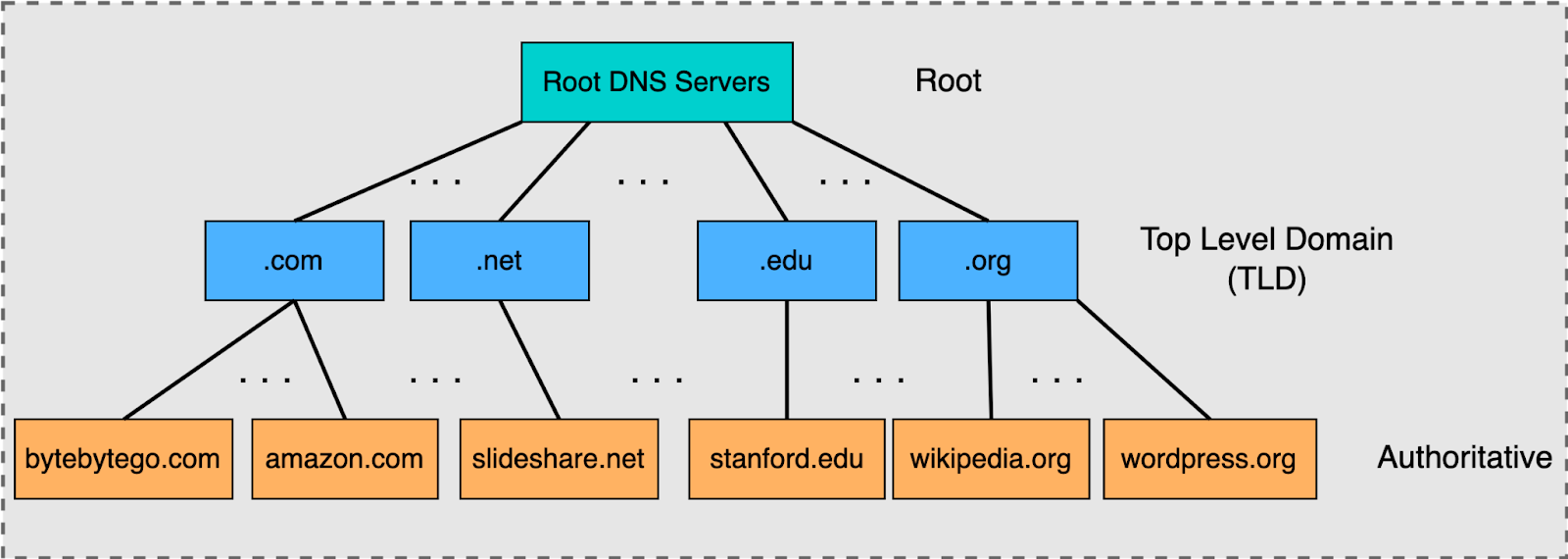
NS Record — Who is responsible for this domain?
Before anything else, DNS needs to know who is in charge of a domain.
That’s the job of the NS (Name Server) record.
An NS record tells the internet:
“For this domain, this is responsible server, go there ask them
So when someone looks up example.com, DNS first checks:
“Which name servers are responsible for this domain?”
Only after that does it move forward.
Think of NS records like the main office of a company.
If you don’t know where the office is, you can’t ask for directions inside the building.
A Record — How do I reach the website? (IPv4)
Once the correct name server is found, the browser asks:
“Okay, now give me the actual address.”
An A record maps a domain name to an IPv4 address.
This is the most common DNS record for websites.
It directly answers:
“What IP address should I connect to?”
If a browser gets an A record, it directly gets the IP of the website.
AAAA Record — Same job, newer address (IPv6)
An AAAA record does the same thing as an A record, but for IPv6 addresses.
IPv6 exists because the internet started running out of IPv4 addresses.
So:
A record → IPv4
AAAA record → IPv6
If both exist, modern systems usually prefer IPv6.
CNAME Record — One name pointing to another name
Sometimes you don’t want multiple domain names pointing to different IPs.
You just want them to follow one main name.
That’s what a CNAME record does.
A CNAME doesn’t point to an IP address.
It points to another domain name.
So when DNS sees a CNAME, it basically says:
“This domain points to this another domain”
This is extremely useful when:
You want
www.example.comto followexample.comYou’re using third-party services like CDNs
MX Record — Where should emails go?
Websites and emails are two different things.
A browser doesn’t care about emails, but mail servers do.
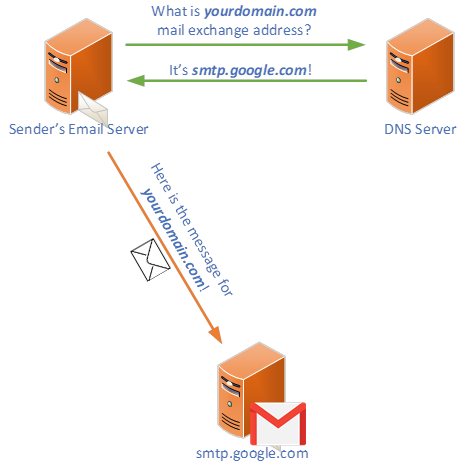
An MX (Mail Exchange) record tells the internet:
“If someone sends an email to this domain, deliver it here.”
Without MX records, emails simply won’t know where to go.
MX records often point to completely different servers than the website.
TXT Record — Extra information and verification
TXT records are flexible.
They store plain text information related to a domain.
Most commonly, they are used for:
Domain ownership verification
Email security (SPF, DKIM, DMARC)
Third-party service verification
Think of TXT records as notes attached to a domain.
How all DNS records work together for one website
Let’s put everything together.
When someone visits a website:
DNS checks the NS record to find the correct name server
The name server returns an A or AAAA record for the website
The browser connects to that IP address
If email is involved, MX records handle it
If aliases are involved, CNAME records redirect the lookup
TXT records provide verification and security info
Each record does one job — and does it well.
Clearing common beginner confusion
A vs CNAME
An A record points directly to an IP address.
A CNAME points to another domain name.
NS vs MX
NS decides who controls the domain.
MX decides where emails are delivered.
Final thoughts
It is fascinating to see how internet works under the hood. So many things happenings all at once. We should be grateful to the people who have built this system so well structured and mannered that everything works so smoothly. Without these things there would have been so much chaos and confusion.


