Dns Resolution

How DNS Resolution Works
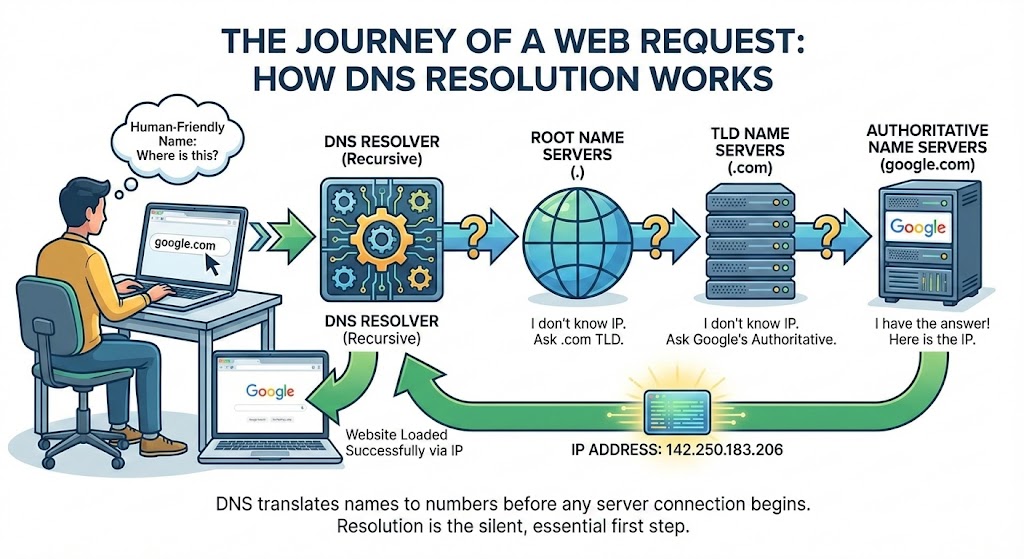
Whenever we open a browser and type a website name like google.com, we expect the website to load instantly. What we do not see is that before any page loads, before any request reaches a server, the browser first needs to answer one basic question. Where is this website located on the internet?
That question is answered by DNS.
DNS works silently in the background, but without it, the web simply would not function in the way we know it today.
What is DNS and why name resolution exists
DNS stands for Domain Name System. Its job is to translate human-friendly domain names into IP addresses that computers understand. Humans remember names easily, machines do not. Machines need numbers.
If DNS did not exist, we would have to type IP addresses like 142.250.183.206 instead of google.com. That clearly is not practical. Name resolution exists to solve this exact problem. It allows humans to interact with the internet using names while computers continue communicating using numbers.
What is the dig command and when it is used
dig is a command-line tool used to query DNS servers manually. It stands for Domain Information Groper. Unlike a browser, dig does not hide anything. It shows exactly how DNS responds to a query.
Developers and system engineers use dig to debug DNS issues, inspect records, and understand how resolution actually happens. When something goes wrong with a website and the browser only says “site not reachable”, dig helps answer where the problem really is.
Running dig google.com asks a DNS server for information related to that domain and prints the response in detail.
Understanding dig . NS and root name servers
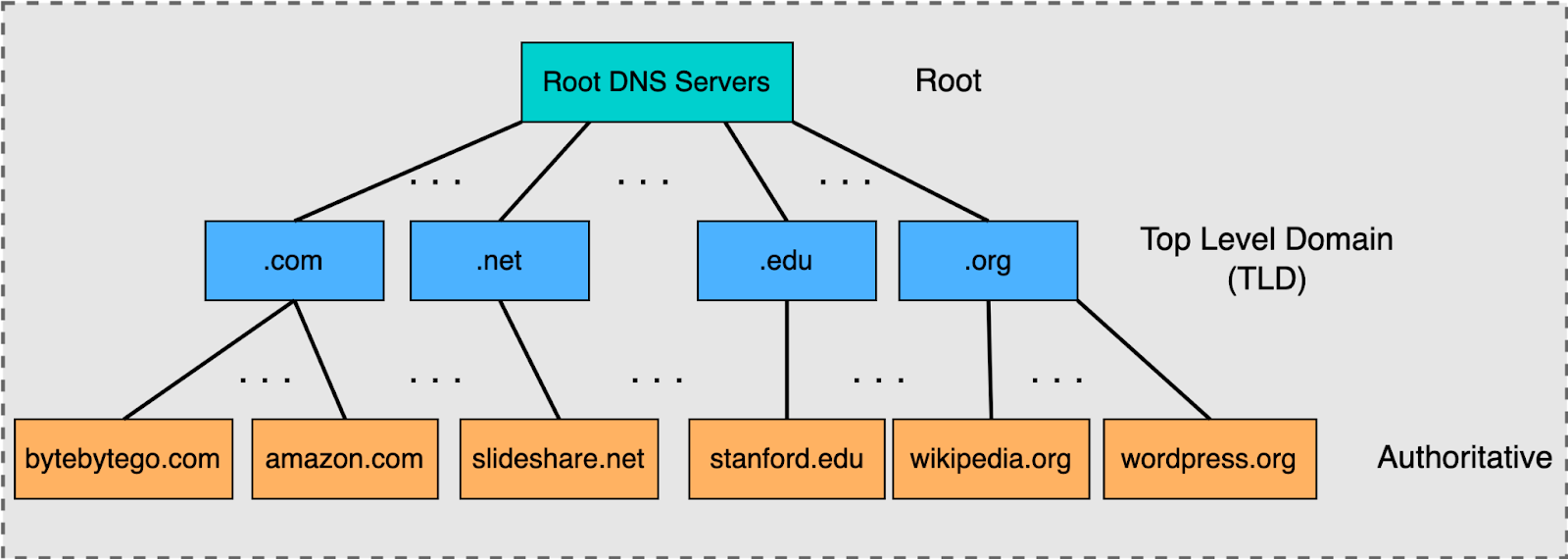
When we run dig . NS, we are querying the root of the DNS hierarchy. The dot represents the root zone. Root name servers are the starting point of DNS resolution.
Root servers do not know the IP address of google.com or any other website. Their role is not to answer the final question. Their role is to guide the resolver to the correct top-level domain.
When asked about a domain ending with .com, root servers respond with information about the servers responsible for the .com TLD. They are essentially saying, I do not know the answer, but I know who to ask next.
Understanding dig com NS and TLD name servers
The next step is querying the TLD name servers using dig com NS. TLD servers manage entire domain extensions like .com, .org, and .net.
These servers still do not store IP addresses for individual websites. Instead, they store information about which authoritative servers are responsible for domains under that TLD.
When asked about google.com, the .com TLD servers respond with the name servers owned by Google. They narrow the search further and move the resolver closer to the final answer.
Understanding dig google.com NS and authoritative name servers
When we run dig google.com NS, we are asking which servers are authoritative for google.com. Authoritative name servers are controlled by the domain owner and store the actual DNS records.
These servers are the source of truth. They hold records like A, AAAA, MX, and others. Once the resolver reaches the authoritative server, it finally knows where the domain actually points.
Understanding dig google.com and the full DNS resolution flow
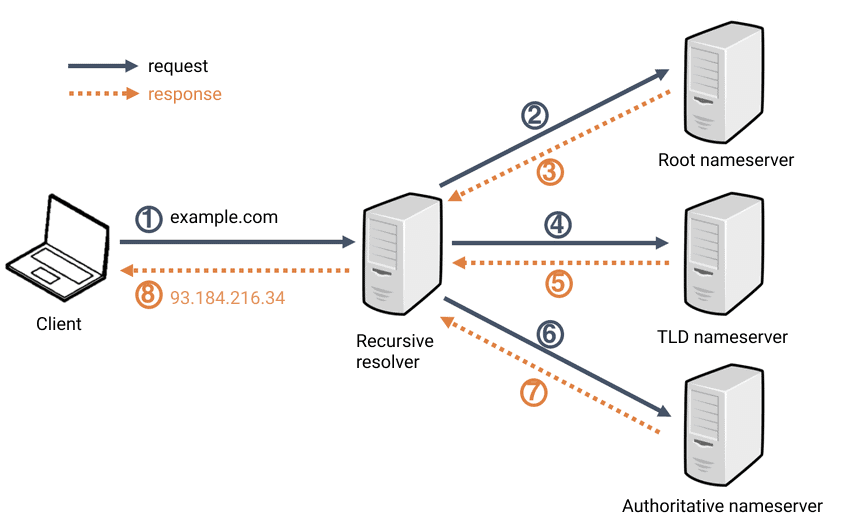
When we run dig google.com, the complete DNS resolution process takes place. The recursive resolver starts from the root, moves to the TLD servers, then reaches the authoritative servers, and finally receives the IP address.
This IP address is returned to the client and usually cached for some time so future requests are faster. Only after this entire process does the browser initiate an HTTP or HTTPS connection.
DNS resolution always happens before any web request is made. If DNS fails, the browser never even reaches the server.
Why NS records matter
NS records define responsibility in DNS. They tell the system which servers are allowed to answer queries for a domain.
Each level in the DNS hierarchy trusts the NS records provided by the level above it. This trust chain is what keeps DNS structured and predictable. If NS records are misconfigured, resolution breaks, even if the server itself is working fine.
How this connects to real-world browsing
The output you see in dig is the same information your browser relies on, just without hiding it. Every website load begins with DNS, whether we notice it or not.